
The new SnekLog has been live for a little over a week now, and things have gone fantastically well! A huge thank you to everyone who has sent in feedback so far.
Since launch a few people have pointed out bugs or small clarity issues, as well as asking for new features. Almost everything mentioned in this update came straight from those messages, so please keep them coming with the Send Feedback button in the app.
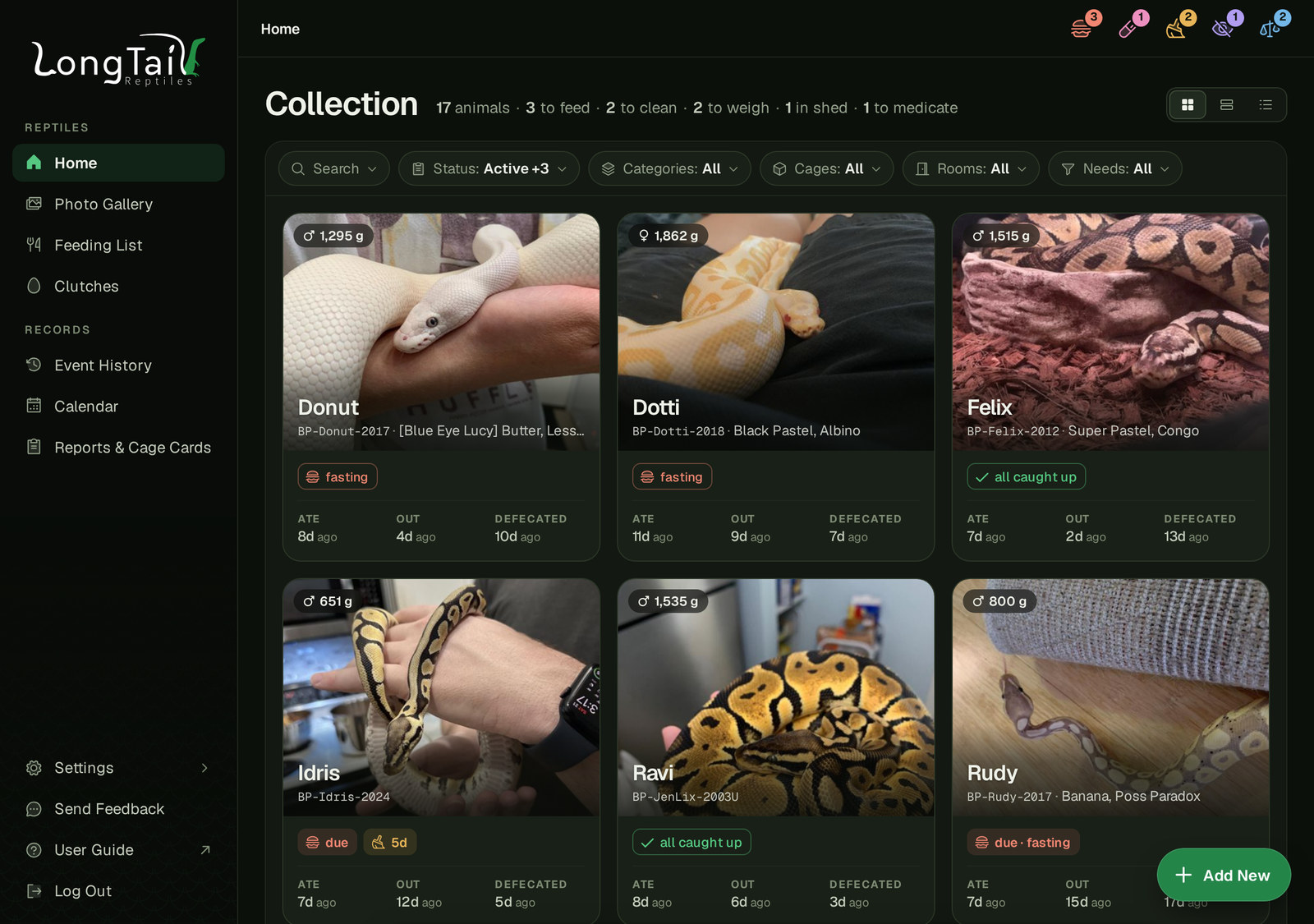
New Photo Cards on Home
The very first piece of feedback after launch asked for the Last ate, Last out and Last defecated dates from the Rows layout to be on the photo cards too. The cards got a bit of a redesign with the name sitting on the photo and those dates underneath. On a phone it's one big card per row.
Customize Your Reptile Dashboard
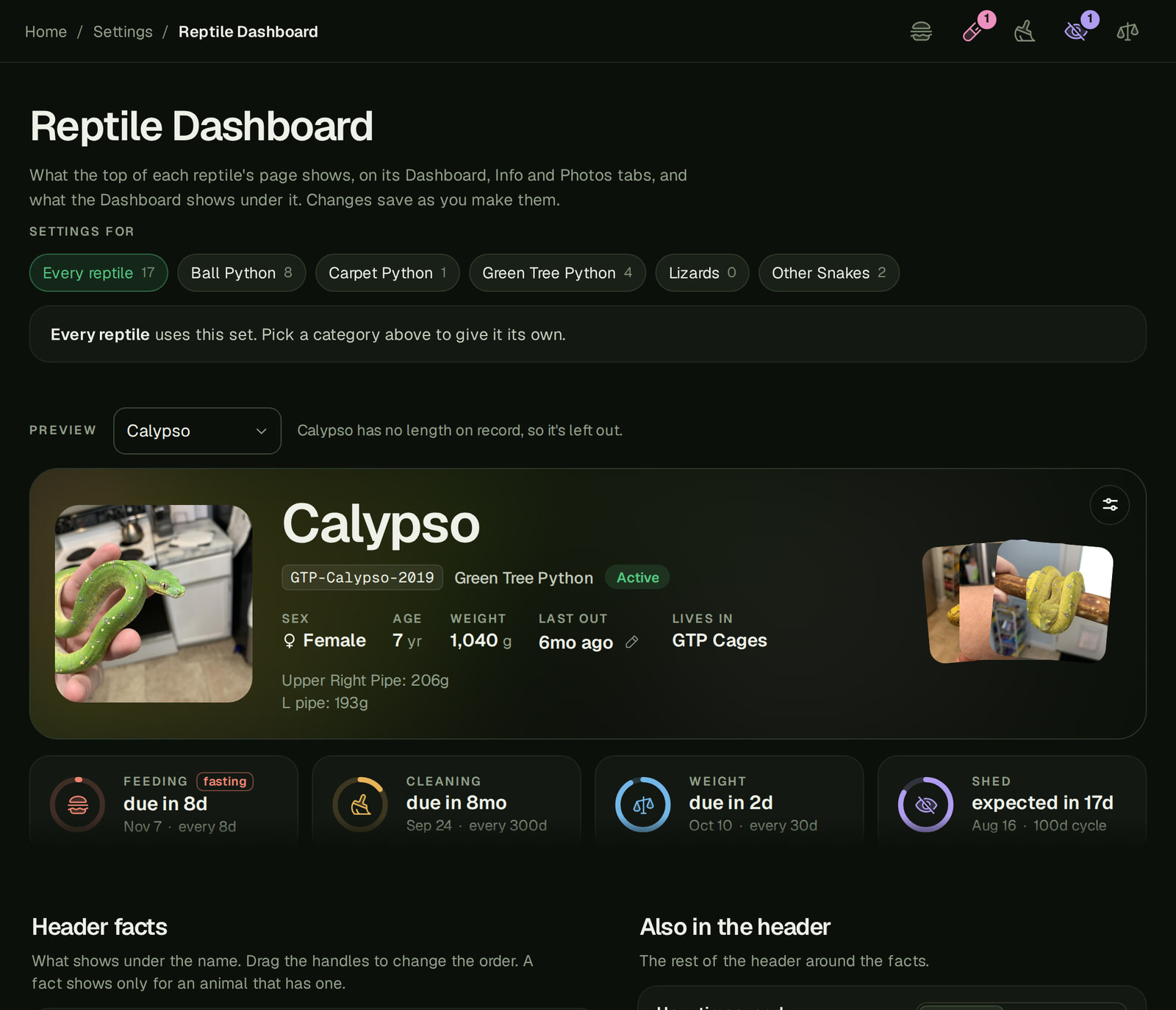
A member asked if "Last ate" and a few other dates could show at the top of a reptile's page. Rather than adding them for everyone, there's now a whole settings page for it under Settings › Reptile Dashboard, so everyone can set it up the way they like.
- Pick which facts show in the header and in what order. There's a long list to choose from, like Last ate, Last defecated, Last shed, Usual meal, Microchip and more.
- Choose how dates read: "5mo ago", the date itself, or both.
- Reorder or hide the sections on the Dashboard (Care dials, Quick Feed, Rhythm, Growth and History) and pick which dials show.
- Give a Reptile Category its own setup. For example, I have my Dog in SnekLog so he gets his own category and I am able to turn off things related to Feeding and Shedding, but keep weight and medication tracking.
There's a live preview built from your own animals, and a new button in the top right corner of every reptile's header takes you straight there. If you don't change anything, your pages stay how they are. Hiding a dial only hides it, its reminder still counts everywhere else. If you ever want to return to the SnekLog defaults, you can also click "Back to the usual mix" at the bottom of the customization page.
Food Stock Warnings
Another member pointed out that you could set up food stock and never actually see a warning, since "running low" only showed on the Feeding List. This has been updated so now:
- Logging a feeding tells you right away when that size is running low, from anywhere in the app.
- Each size can have its own "Warn me at" number if you'd rather pick when it warns you.
- "Update the count" takes you straight to that size instead of the top of the Food page.
Smaller Changes
- The Daily Food List is now called the Feeding List.
- "Repeat every" on the feeding form is now Next Feeding in.
- Medication amounts and doses take plain numbers now.
- Last defecated only counts Defecate and Defecate & Urate, not Urate on its own (another one from your feedback).
- While an animal is in shed, the Shed dial shows what day it's on and about how long it should take ("day 3 of ~6"), and the Calendar shows when it should be done.
- Putting a trip plan on the calendar now asks first if it would replace something you picked by hand.
Bug Fixes
- Fixed an issue where using Google Translate in Chrome could crash the page
- Fixed an issue where something logged 23 hours ago could say "today" instead of "yesterday"
- Fixed an issue where something due a little over a day away said "due in 2d"
- Fixed a bug where logging a feeding with "No size" saved it with the animal's usual size anyway
- Fixed an issue where the feeding form showed "Next Feeding in" on a refusal when it doesn't change anything (unless the animal is fasting)
- Fixed a handful of wording mistakes around the app, like "1 animals"
That's it for this one. Things should settle down a bit from here, and the iOS and Android apps are still next on the big list.
As always, thanks for using SnekLog! TJ